Panelytics TR Live demo

For sandwich panel manufacturers

From coil to shipment, all of sandwich panel production in one program.

Panelytics was built for PUR/PIR sandwich panel production and is used every day in a working plant. Orders, steel, chemicals, packages, shipping and reports in one program; the floor team works from their own phones.

The demo is the real program, running on one month of data from a fictional company.

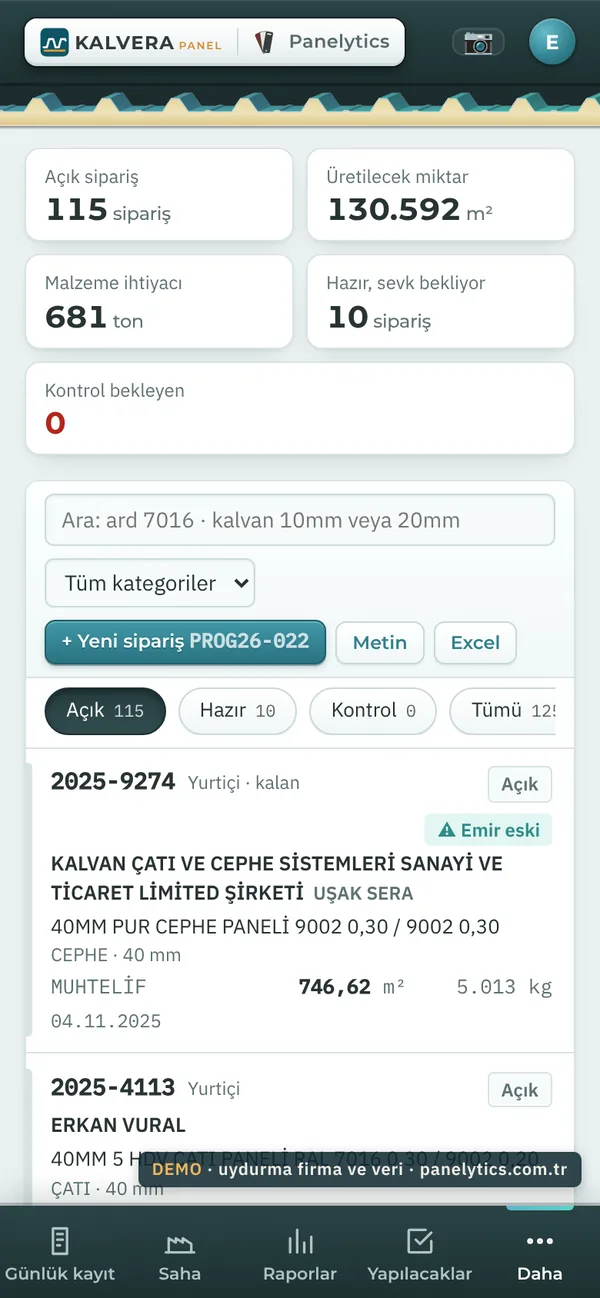
Panelytics · Orders
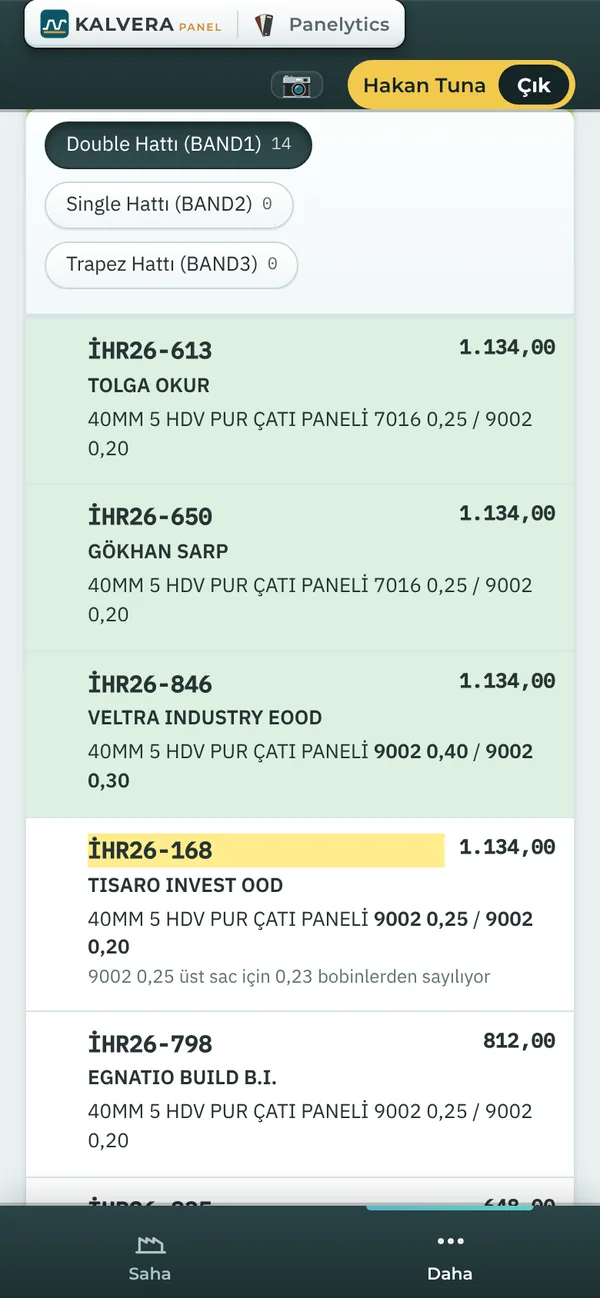
Phone screen
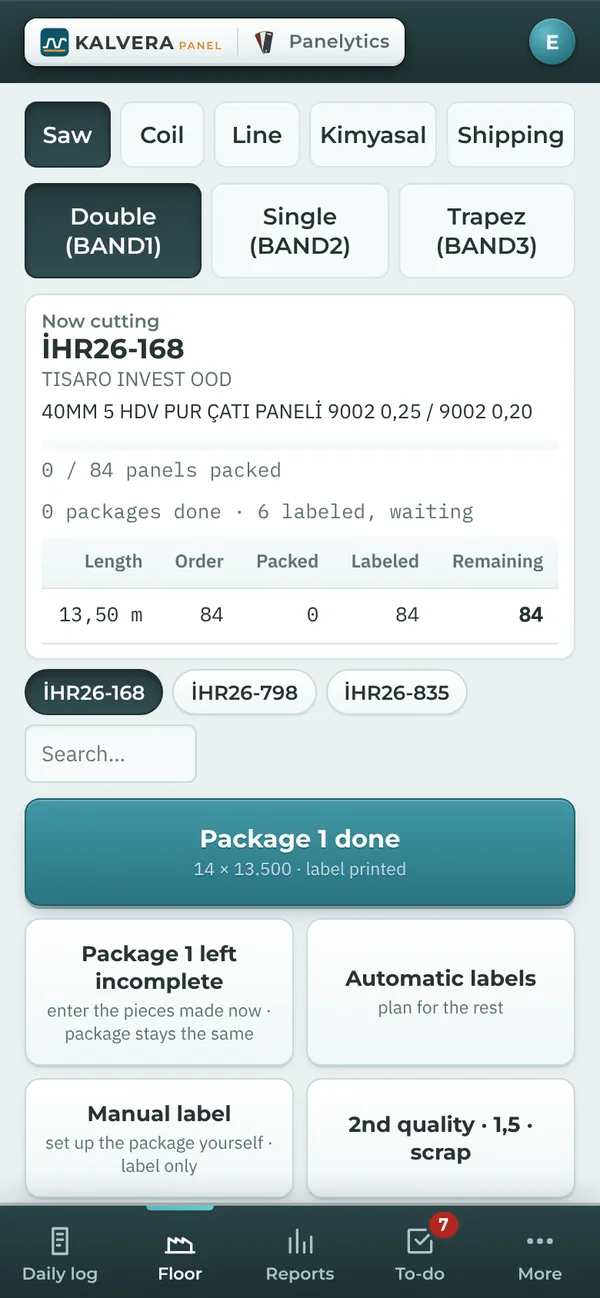
Cutting screen: package done
8sections, one program
5shop-floor roles, each on its own screen
4interface languages, Arabic right-to-left
3hours between backups

Who it is for

Continuous-line producers of PUR/PIR roof, wall and cold-room panels · single-skin panel and profiled sheet producers · toll manufacturers.

From order to shipment

Every step from order to shipment. Every plant works differently; each step is set up to match yours.

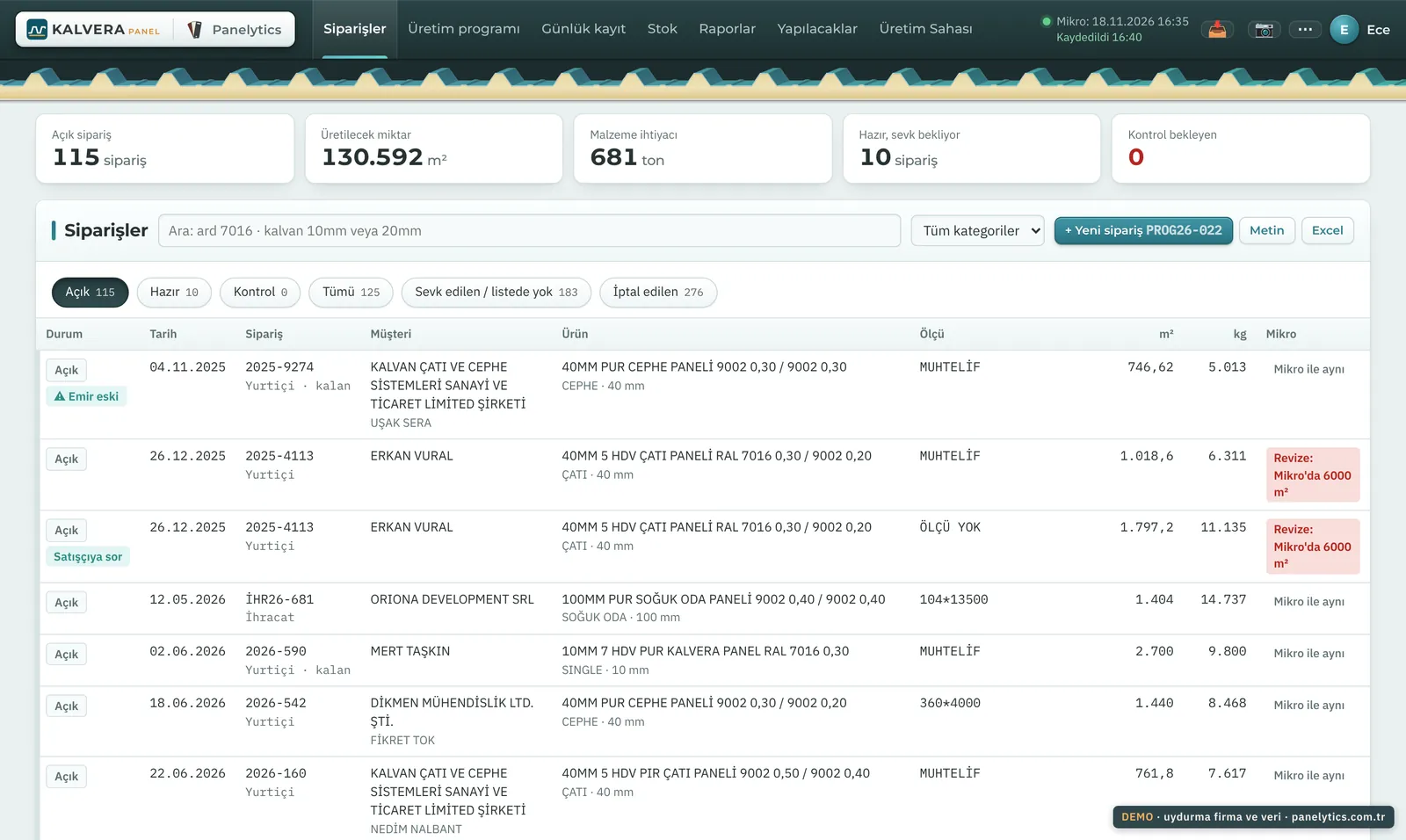
01Orders

From your ERP, already calculated

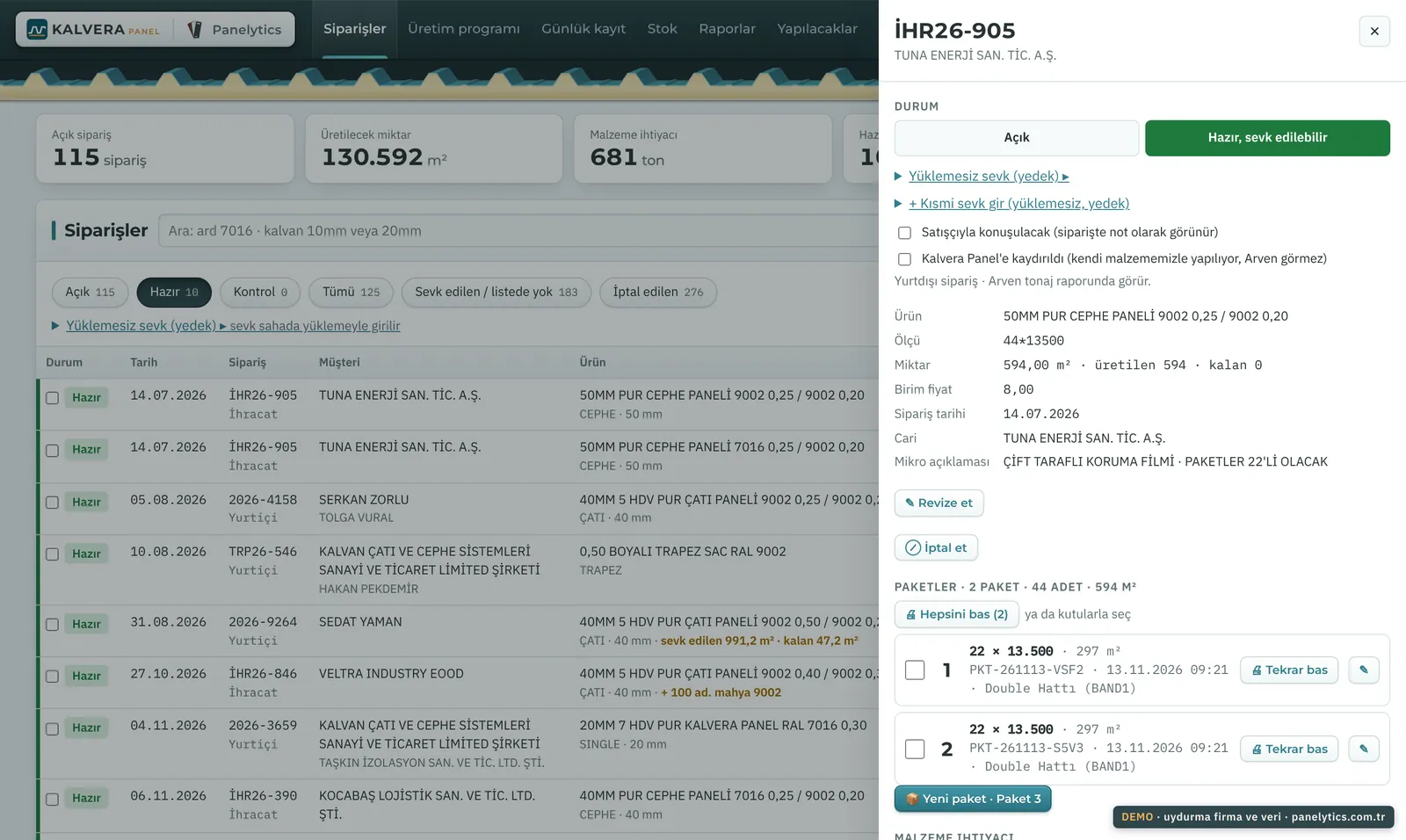
Orders are imported from your ERP. Every line arrives with m², steel and chemical demand already calculated; later changes in the ERP are flagged.

  • Cut list, packages, produced and remaining quantity
  • Production order in one click
  • Ready-made Mikro ERP link; other systems can be adapted
Order detail

02Production schedule

Run order per line, materials checked in advance

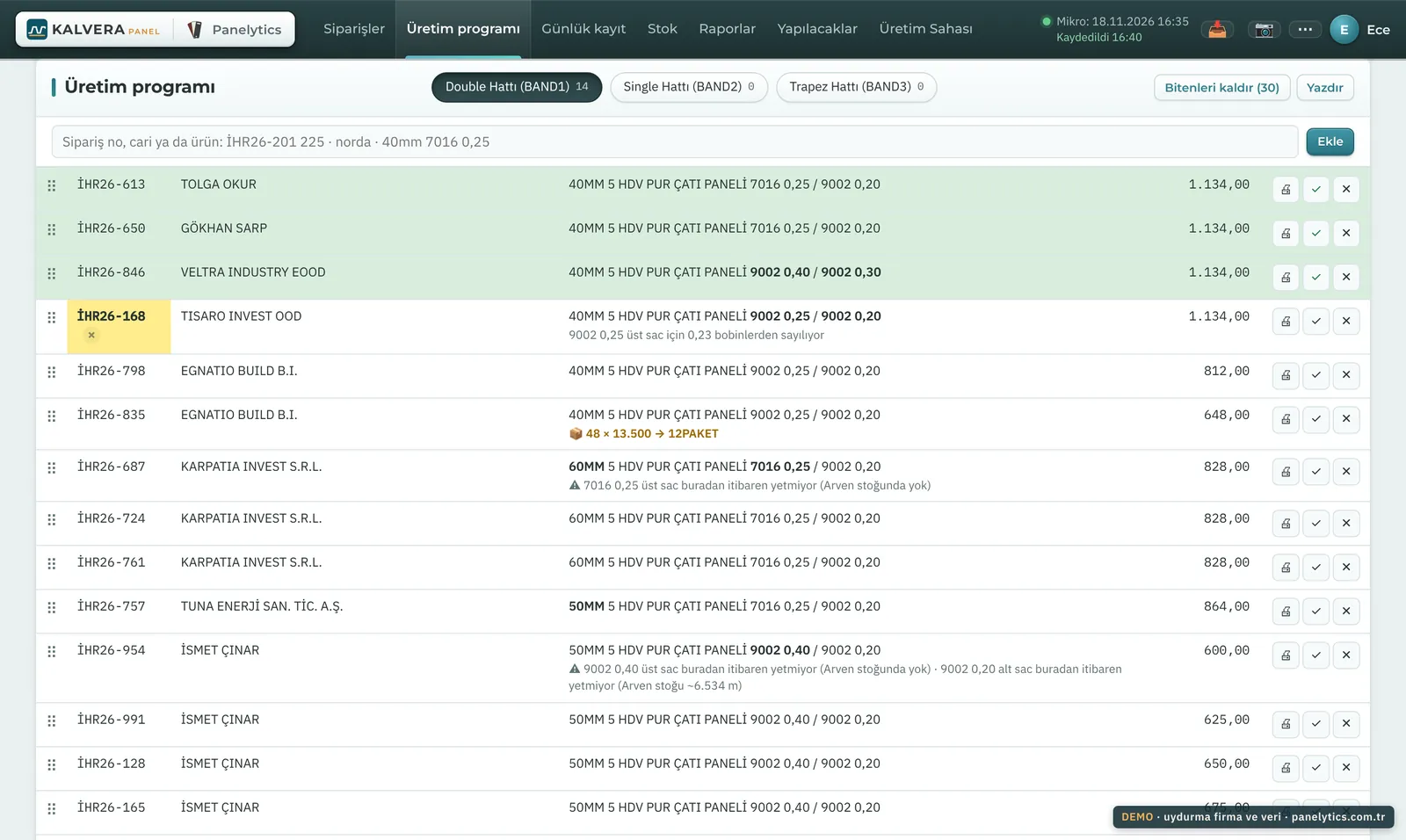
The run order of each line is planned by drag and drop. Each order's steel and chemical demand is checked against stock; shortages show up before the order comes up.

  • Steel checked by gauge and colour
  • Open orders in the program when the ERP is unreachable
  • Printable daily plan
Production schedule

03Shop floor

Each operator on their own phone, seeing only their own job

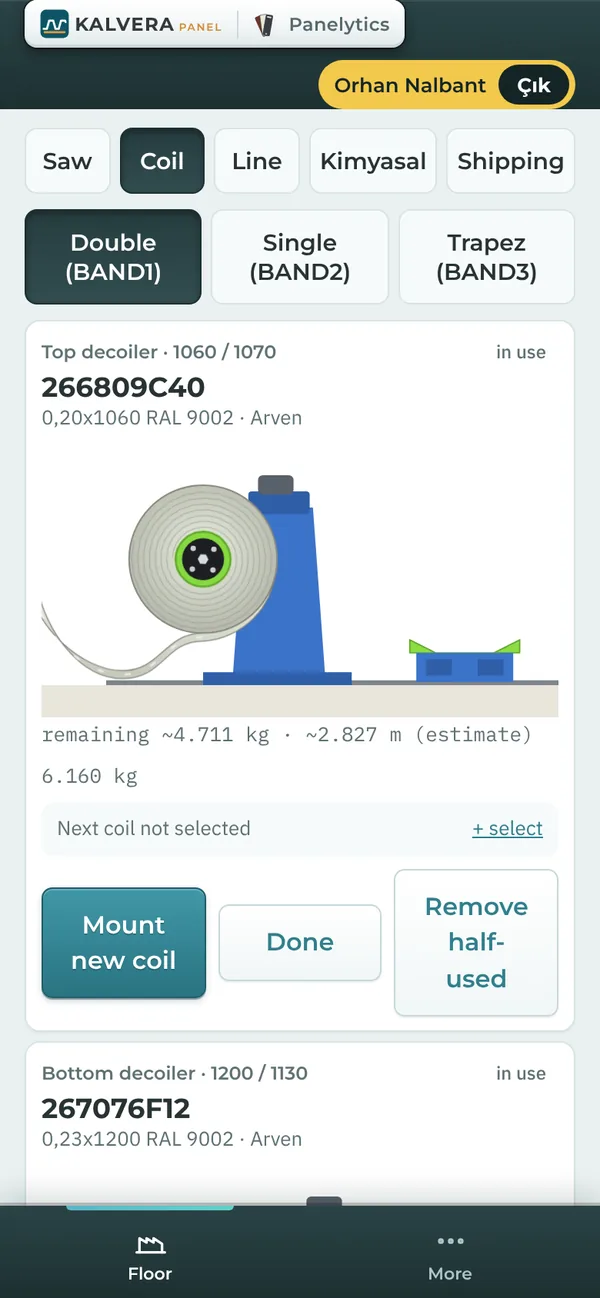
Cutting and packing, coil feeding and line operators each see only their own screen: packages are completed, coils changed, line settings entered. Chemical containers and packages are scanned by QR; shipments are recorded truck by truck.

  • Turkish, Arabic, Kurmanji and English interface
  • If the connection drops, entries wait on the phone
  • Every record shows who, when and with which material
Shop-floor screen · Coil feeding · English
Coil feeding · English
Shop-floor screen · Cutting & packing
Cutting & packing
Shop-floor screen · Manager · Orders
Manager · Orders

04Labels

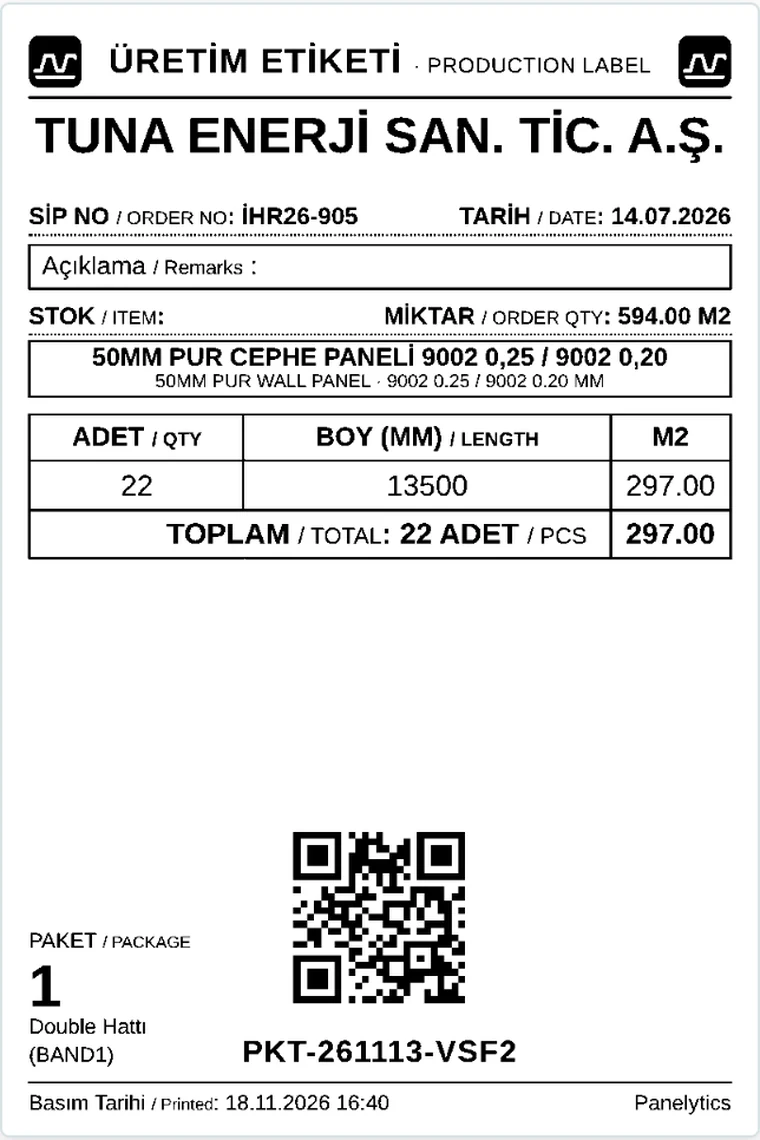
The label prints on the floor when the package is complete

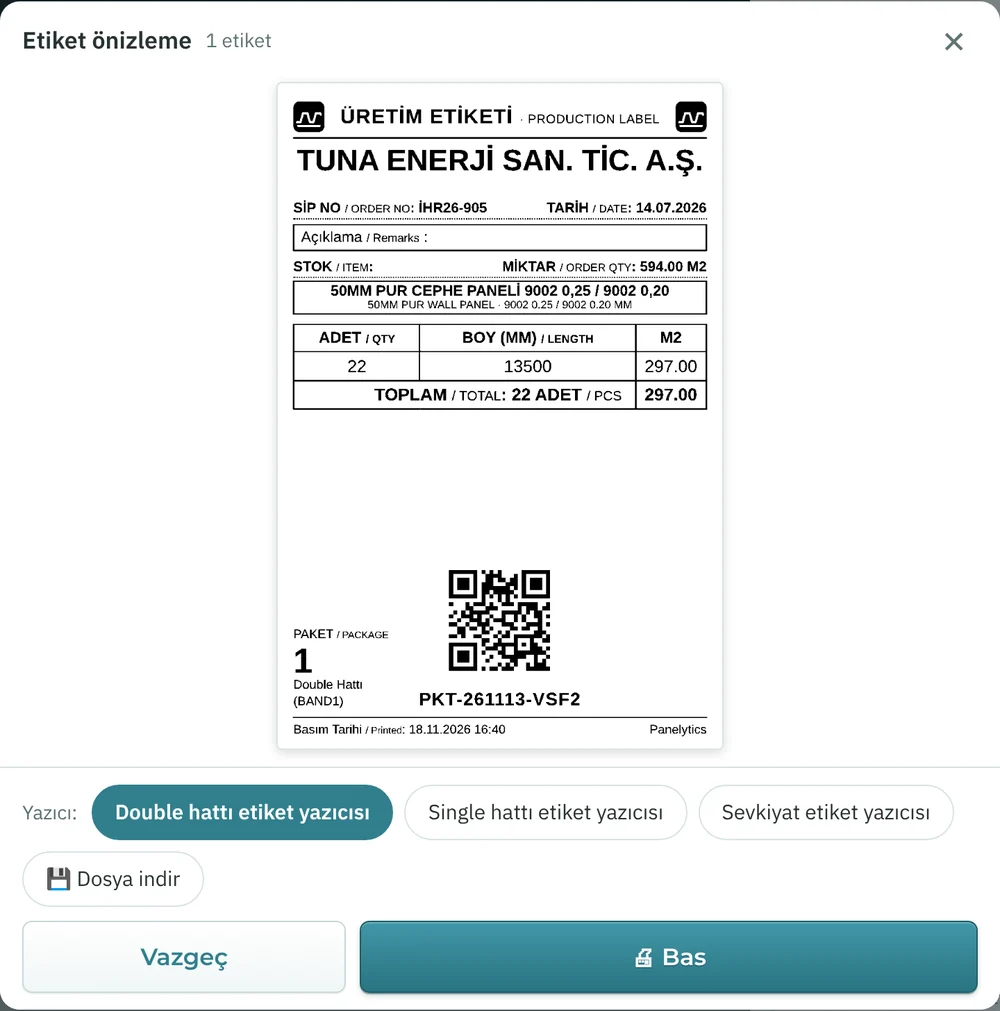
The moment the cutting and packing operator marks a package as complete, its label prints on the network label printer. It carries the customer, order, product, quantity, length, m² and the package QR code; bilingual Turkish/English for export orders. Scanning the QR code shows which order the package belongs to and which truck it left on.

  • Printer choice and one-tap printing
  • Labels that failed to print wait in a list and can be reprinted from the floor
  • Label size and logo set for your company
Package label
Cutting screen: package done

05Steel coils

Stock and yield, coil by coil

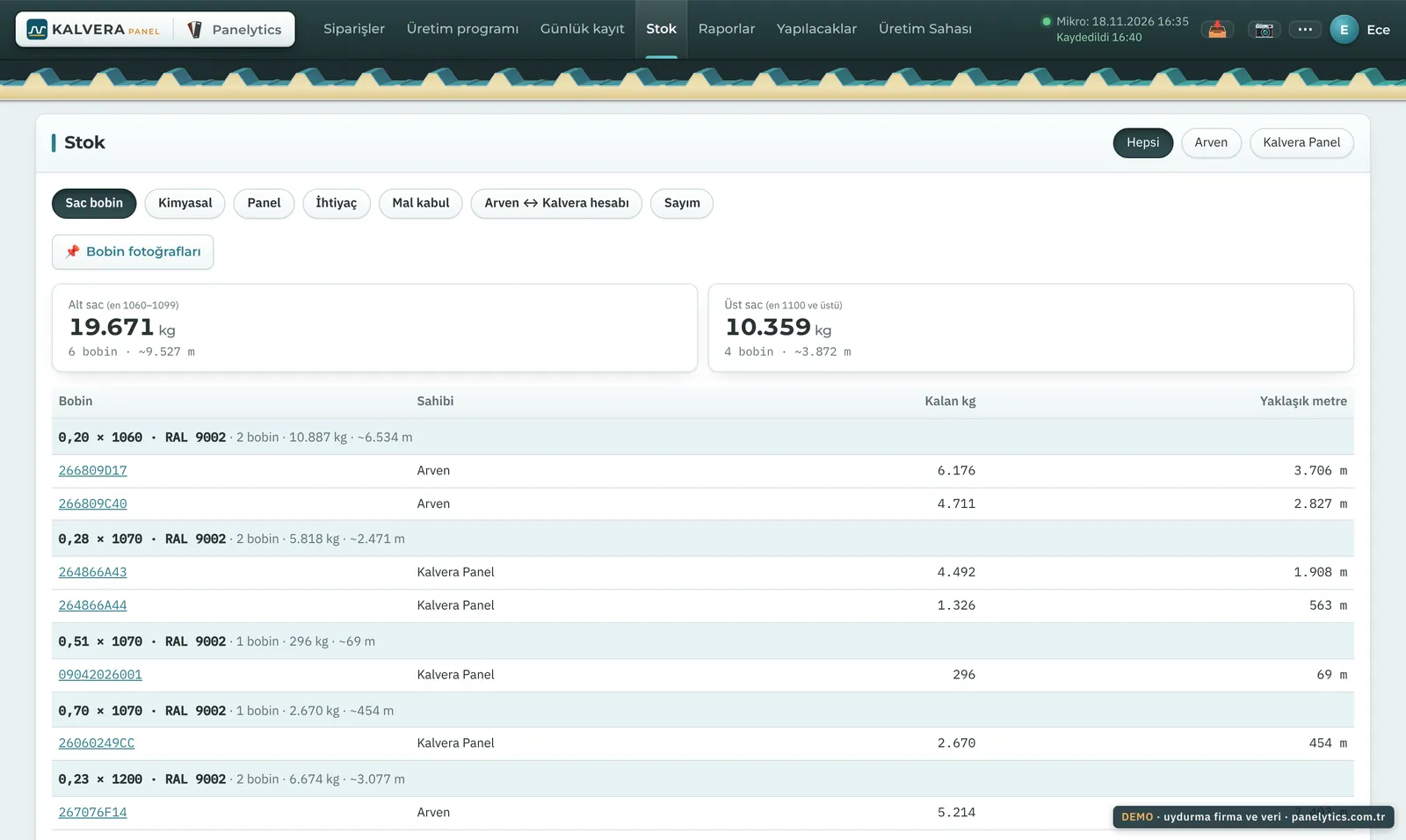
Remaining weight and length of every coil are tracked. When a coil runs out, the actual length is compared with what the label and weighbridge weights predicted; deviations are reported.

  • Label and weighbridge weights kept apart
  • Company and customer material in separate stock
  • Goods-in: delivery note, coil no., weighbridge, photo
Steel coil stock

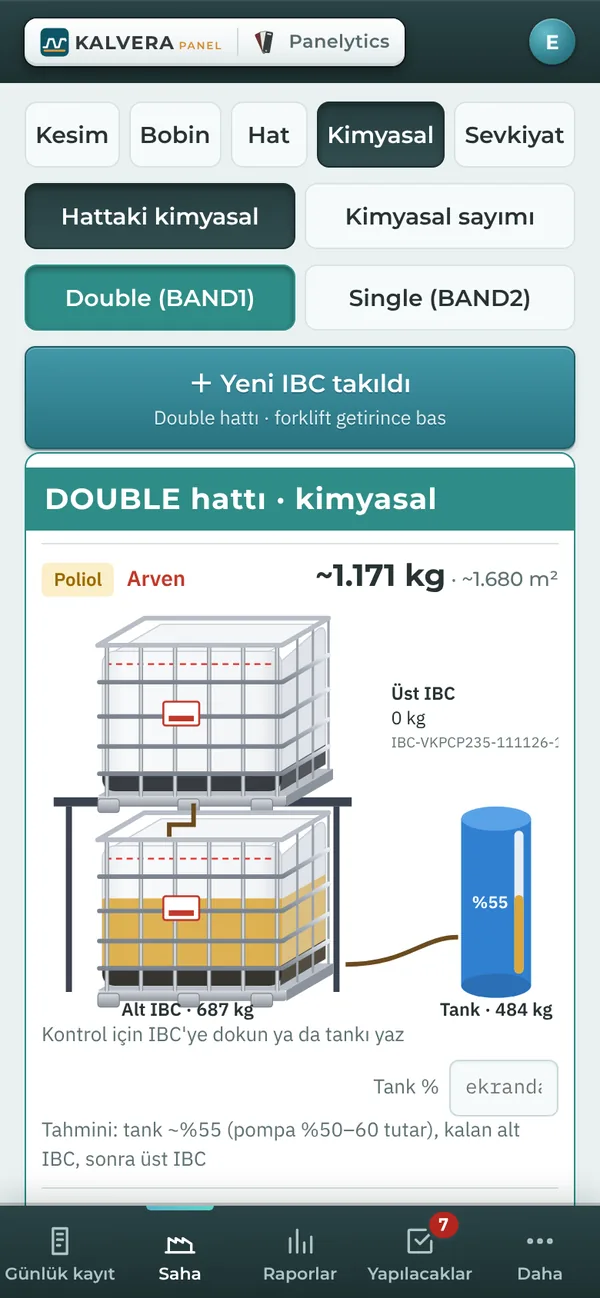
06Chemicals

Polyol and isocyanate consumption

Consumption per m² is calculated from line settings and checked against counts. Which container is on which line and what is left are on one screen; you are warned before it runs out.

  • Daily check of the mixing ratio
  • IBC and tank tracking
  • Ownership of material kept separate
Chemicals screen

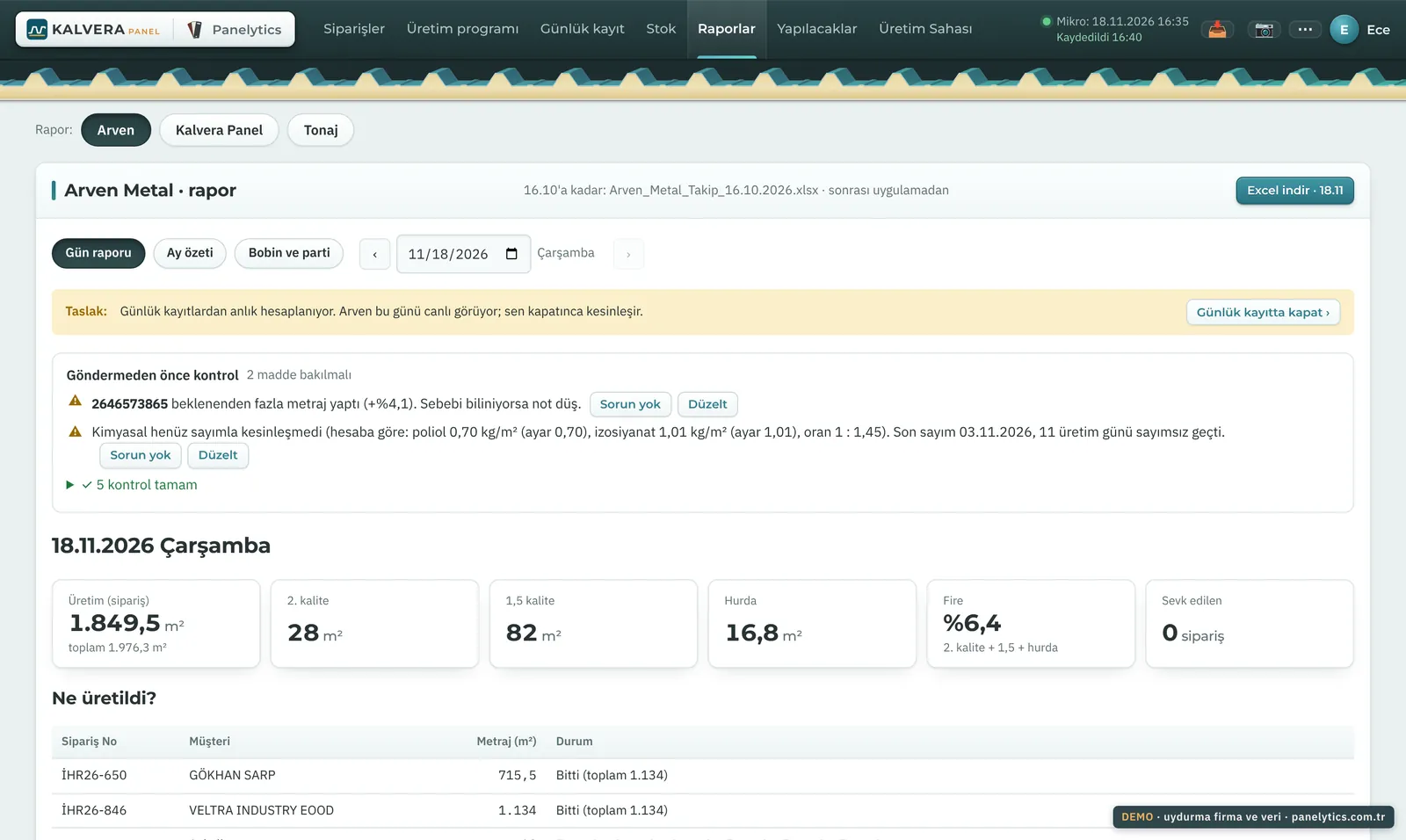
07Reports

A production report ready every day

Output, scrap, quality split, material consumption and end-of-day stock are ready every day. If you do toll manufacturing, your customer gets a separate report and sees only their own orders.

  • A closed day's report never changes
  • Excel export
  • Tonnage report: material demand for any selection of orders
Daily report

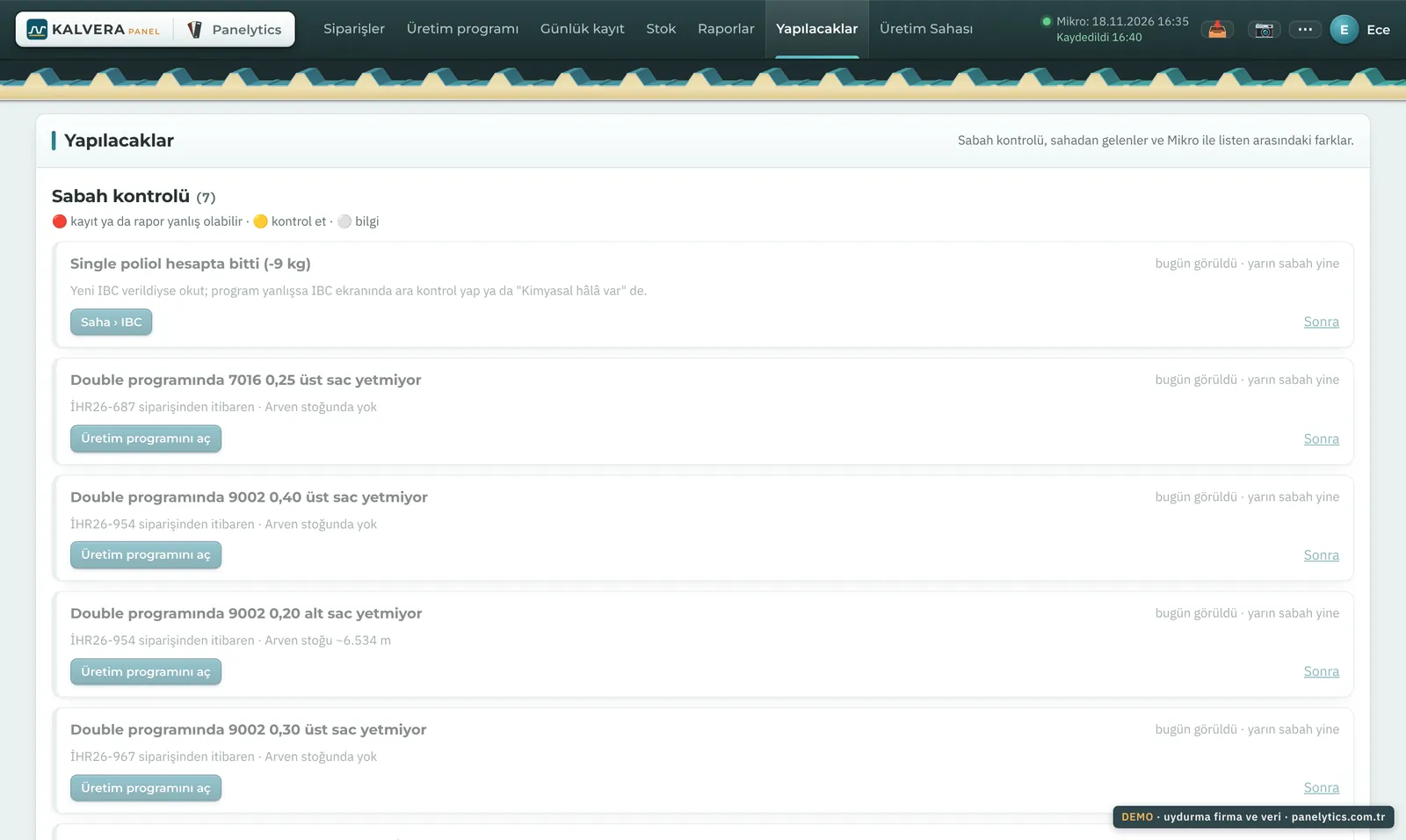
08To-do

The program audits itself

Differences with the ERP, missing sizes, pending packages, materials that will run short and days left open are listed every morning. Each item comes with a button that fixes it.
  • Sorted by importance
  • Approval of entries from the floor
  • Forgotten tasks do not pile up
To-do
01 / 08
Order detail
Production schedule
Shop-floor screen · Coil feeding · English
Coil feeding · English
Shop-floor screen · Cutting & packing
Cutting & packing
Shop-floor screen · Manager · Orders
Manager · Orders
Package label
Cutting screen: package done
Steel coil stock
Chemicals screen
Daily report
To-do

The details make the difference

A fix for each of the small problems a panel plant runs into every day.

QR and shop floor

QR with the phone camera
Package and IBC labels are scanned with a phone; Android and iPhone.
Nothing is lost offline
Entries wait on the phone and go out when the connection returns.
Late entries are caught
An entry landing on a closed day is never added silently; it goes for approval.
No bulk “done”
Every package is completed one by one; numbers match the floor.

Labels

Straight to the printer
No file downloads: straight to the network thermal printer.
Warns if the printer is off
The job is not sent; no late or double prints.
Recent labels list
A label that did not come out is reprinted from the floor.
Bilingual labels
Turkish and English for export orders.

Shipping and goods-in

Loading by plate number
Packages are scanned onto the truck; a photo of the truck is attached.
No package left behind
Warns before loading ends if a package was not scanned.
Weighbridge check
Large differences between weighbridge and label weight are flagged.
Goods-in labels
Incoming material is labelled and enters stock correctly.

Coils and chemicals

Decoiler picture
The loaded coil drawn in its own colour, sized by remaining weight.
Yield report
Expected vs. actual m² for every finished coil.
Consumption from line settings
kg/m² and mixing ratio derived from g/min settings.
Re-assigning wrong production
Panels made with different steel move to another order; past reports stay unchanged.

Record safety

Who and when, on every record
Who entered it, who changed it, and when.
Closing the day
A closed day's report is locked; reopening needs permission.
Backup and restore
Backups every three hours, a cloud copy, one-button restore.
View as
A manager sees any employee's screen through their eyes.

Management

Morning check
Pending work and risks in one list at the start of the day.
Update from the ERP now
No waiting for the next sync; one button, done in minutes.
Production orders that fit the page
Lengths, sections and notes are paged cleanly.
Excel exports
Order list, daily report, tonnage; one click.

Made to fit your plant

The way you work
Number of lines, products, quality grades, roles and reports are set up for your plant.
Permissions by module
For each user, each section is hidden, read-only or editable. An operator sees only their own screen.
Your data stays with you
The program runs on your own computer. Regular backups, a copy in the cloud, and the previous state can be restored when needed.
Your terminology
Role names, line names, report headings and label layout follow the terms used in your plant.
ERP connection
Orders are read from your ERP, never written back. The Mikro link is ready; other systems can be adapted.
Your logo and colours
The program comes with your company's logo and colours.

See the program itself

A fictional panel manufacturer, a month of realistic data and a guided tour. Enter records, press any button; reload and everything starts over.

Open the live demo
To-do

Licensing

Pricing depends on the size of the plant and the modules you choose. Let's talk it through.

  • 01By moduleStart with the section you need and add more later.
  • 02MonthlyUpdates and support included.
  • 03YearlyCheaper than monthly.
  • 04PurchaseOne payment, installed at your plant.

Contact

Let's talk about how it would work in your plant.

Cemre Küçükler